Plugin System
How analysis workflows, binaries, exposures, and exports work — build a plugin node by node.
Plugin workflow structure
Plugin workflows are built in the UI at https://app.voltcloud.dev/dashboard/plugins/list.
A plugin starts with Modifier, Arguments, Context, ForEach, and Entrypoint. One Exposure node is added for each result file VOLT should ingest. To turn an exposure into a 3D artifact, an Export node is connected to it.
| Node | Responsibility |
|---|---|
| Modifier | Defines how the plugin appears in the UI |
| Arguments | Defines the parameters the user configures before execution |
| Context + ForEach | Define which trajectory data is iterated |
| Entrypoint | Defines the runtime and the uploaded payload to execute |
| Exposure | Defines which output file VOLT reads after execution |
| Export | Defines how VOLT interprets geometry or chart data from an exposure |
What a plugin looks like inside
A complete example plugin is at atomistic-exporter-clusters.zip — an importable plugin with its plugin.json and the binary ZIP the Entrypoint node expects.
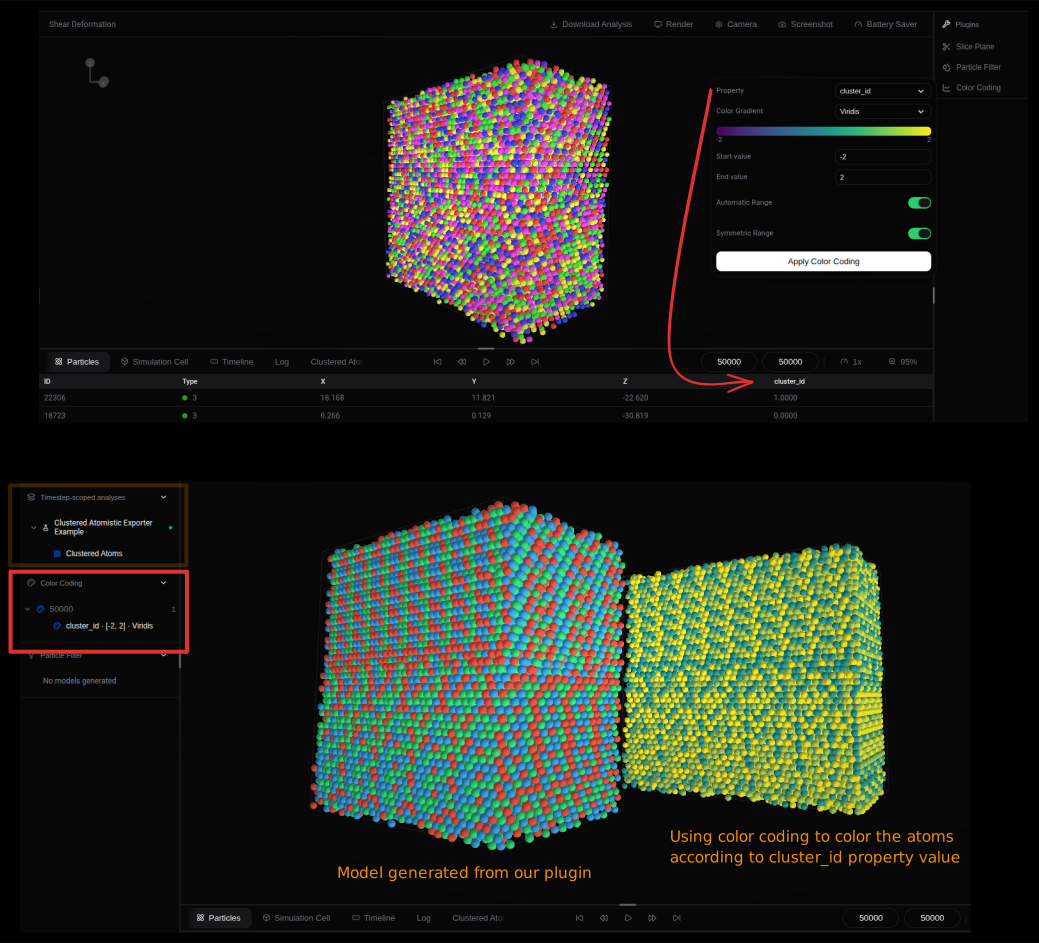
The script reads atom positions from the current dump and groups them into Cluster 0, Cluster 1, and Cluster 2 — the keys VOLT uses to color atoms in the viewer. The same exposure exports a per-atom property named cluster_id. The grouping rule (atom_id % 3) is a placeholder to demonstrate the output format; replace it with real clustering logic.
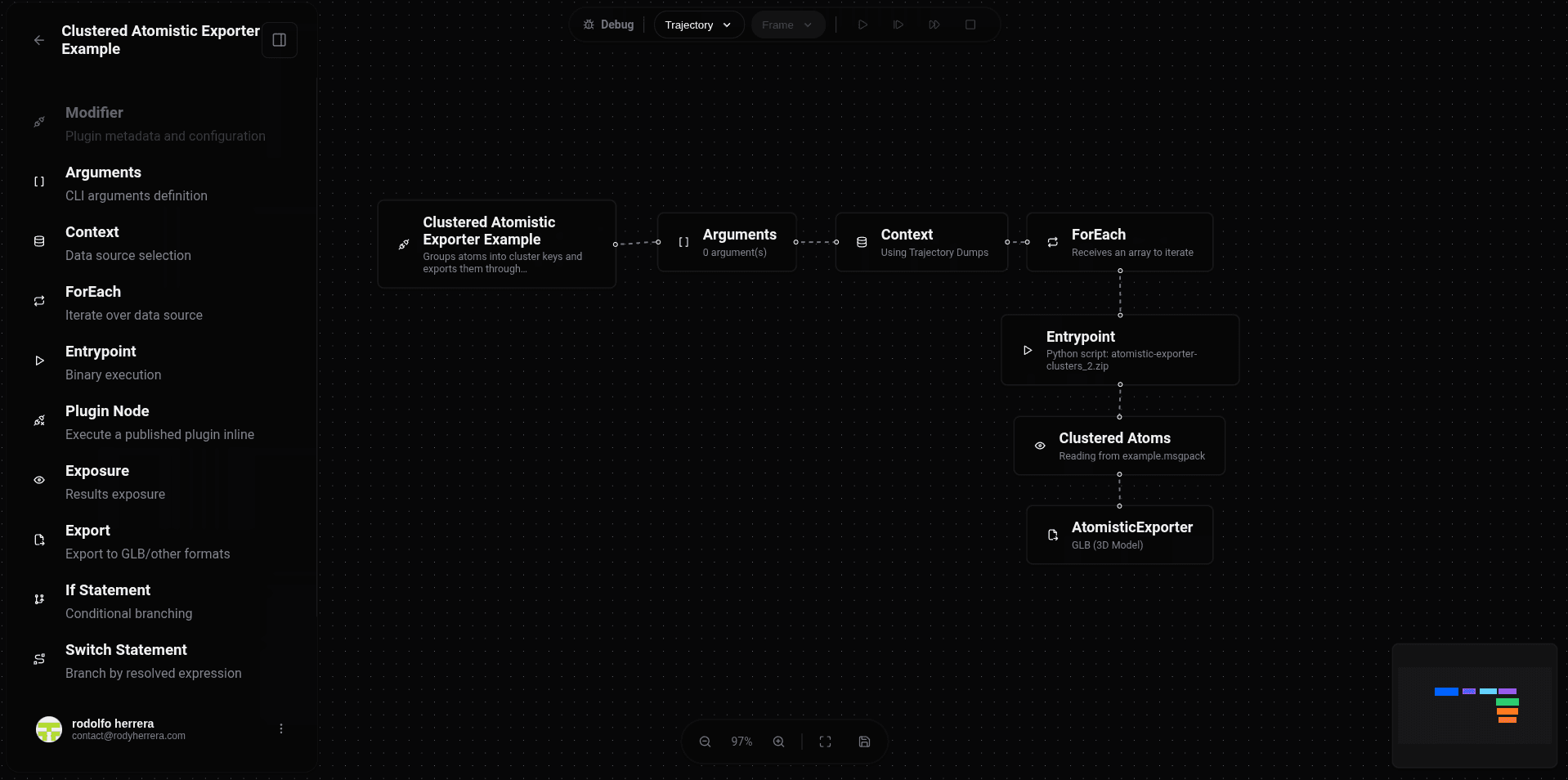
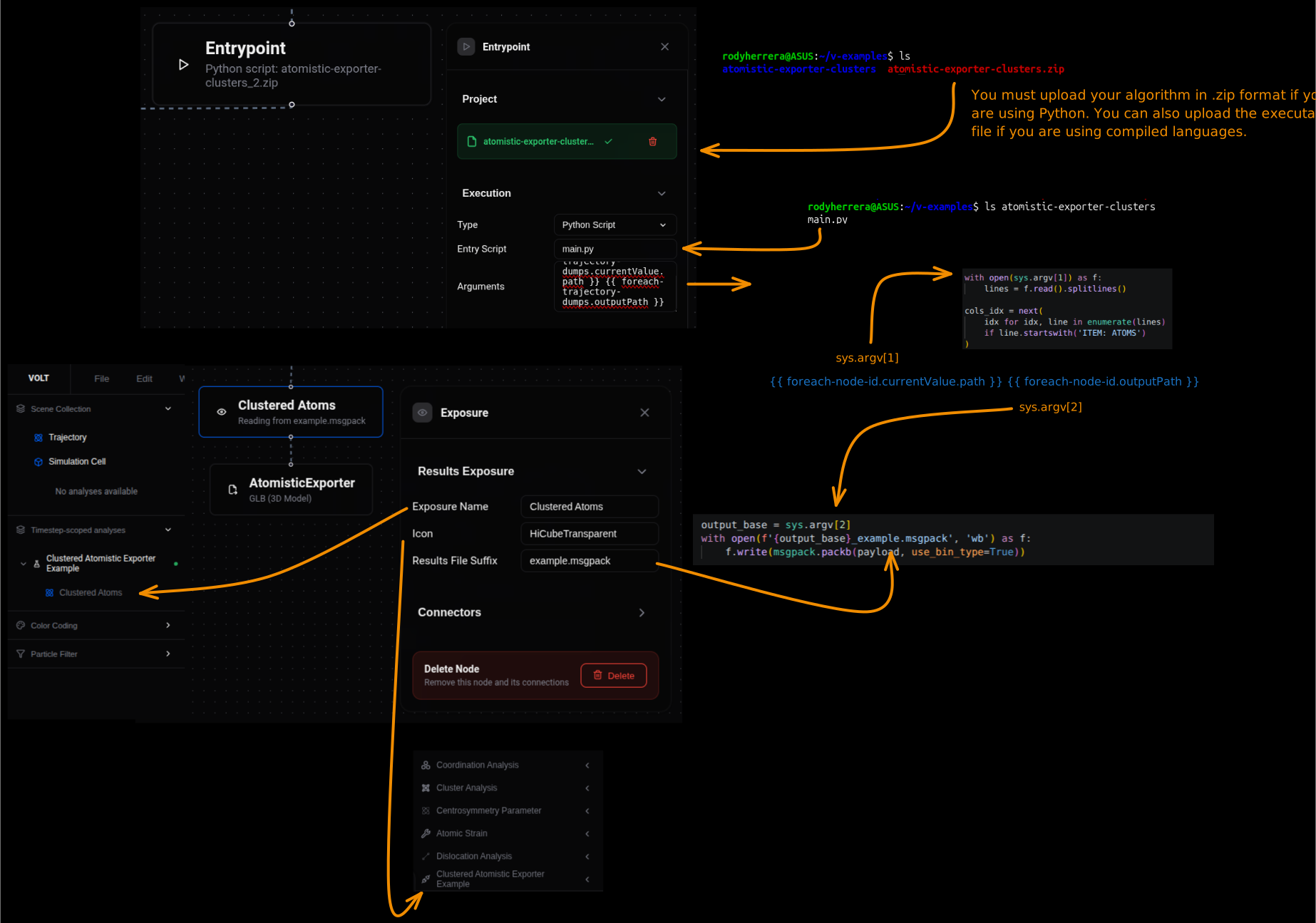
The script runs in four phases: read the dump and find the ITEM: ATOMS section, validate the required columns exist, assign each atom to an example cluster, and build one Apache Parquet payload containing listings, per-atom-properties, and the grouped AtomisticExporter data.
import parquet
import sys

# From "arguments" in Entrypoint node configuration.
input_dump_path = sys.argv[1]
output_base = sys.argv[2]

# Read the current trajectory dump and find the ATOMS section.
with open(input_dump_path) as f:
    lines = f.read().splitlines()

atoms_header_idx = next(
    idx for idx, line in enumerate(lines)
    if line.startswith('ITEM: ATOMS')
)

# The AtomisticExporter needs atom id + position.
atom_columns = lines[atoms_header_idx].split()[2:]

id_idx = atom_columns.index('id')
x_idx = atom_columns.index('x')
y_idx = atom_columns.index('y')
z_idx = atom_columns.index('z')

# This is only an example grouping strategy.
# Replace atom_id % cluster_count with your real cluster assignment logic.
cluster_count = 3
cluster_labels = [f'Cluster {index}' for index in range(cluster_count)]
grouped_atoms = {label: [] for label in cluster_labels}
per_atom_properties = []

# Build both outputs at the same time:
# 1. grouped atoms for AtomisticExporter
# 2. per-atom properties so cluster_id is also available in VOLT tables/filters
for raw_line in lines[atoms_header_idx + 1:]:
    values = raw_line.split()
    atom_id = int(values[id_idx])
    position = [
        float(values[x_idx]),
        float(values[y_idx]),
        float(values[z_idx])
    ]

    # cluster_id is the numeric property, cluster_label is the export group name.
    cluster_id = atom_id % cluster_count
    cluster_label = cluster_labels[cluster_id]
    grouped_atoms[cluster_label].append({
        'id': atom_id,
        'pos': position
    })
    per_atom_properties.append({
        'id': atom_id,
        'cluster_id': cluster_id
    })

export_groups = {
    label: atoms
    for label, atoms in grouped_atoms.items()
    if atoms
}

# sub-listing
cluster_rows = [
    {
        'cluster': label,
        'atoms': len(atoms)
    }
    for label, atoms in export_groups.items()
]

# One exposure file can include listings, per-atom properties, and 3D export data.
payload = {
    'main_listing': {
        'cluster_count': len(export_groups),
        'exported_atoms': sum(len(atoms) for atoms in export_groups.values())
    },
    'sub_listings': {
        'clusters': cluster_rows
    },
    'per-atom-properties': per_atom_properties,
    'export': {
        'AtomisticExporter': export_groups
    }
}

# The Exposure node expects: {output_base}_example.parquet
with open(f'{output_base}_example.parquet', 'wb') as f:
    f.write(parquet.packb(payload, use_bin_type=True))

print(f'Wrote {output_base}_example.parquet with {len(export_groups)} atom groups')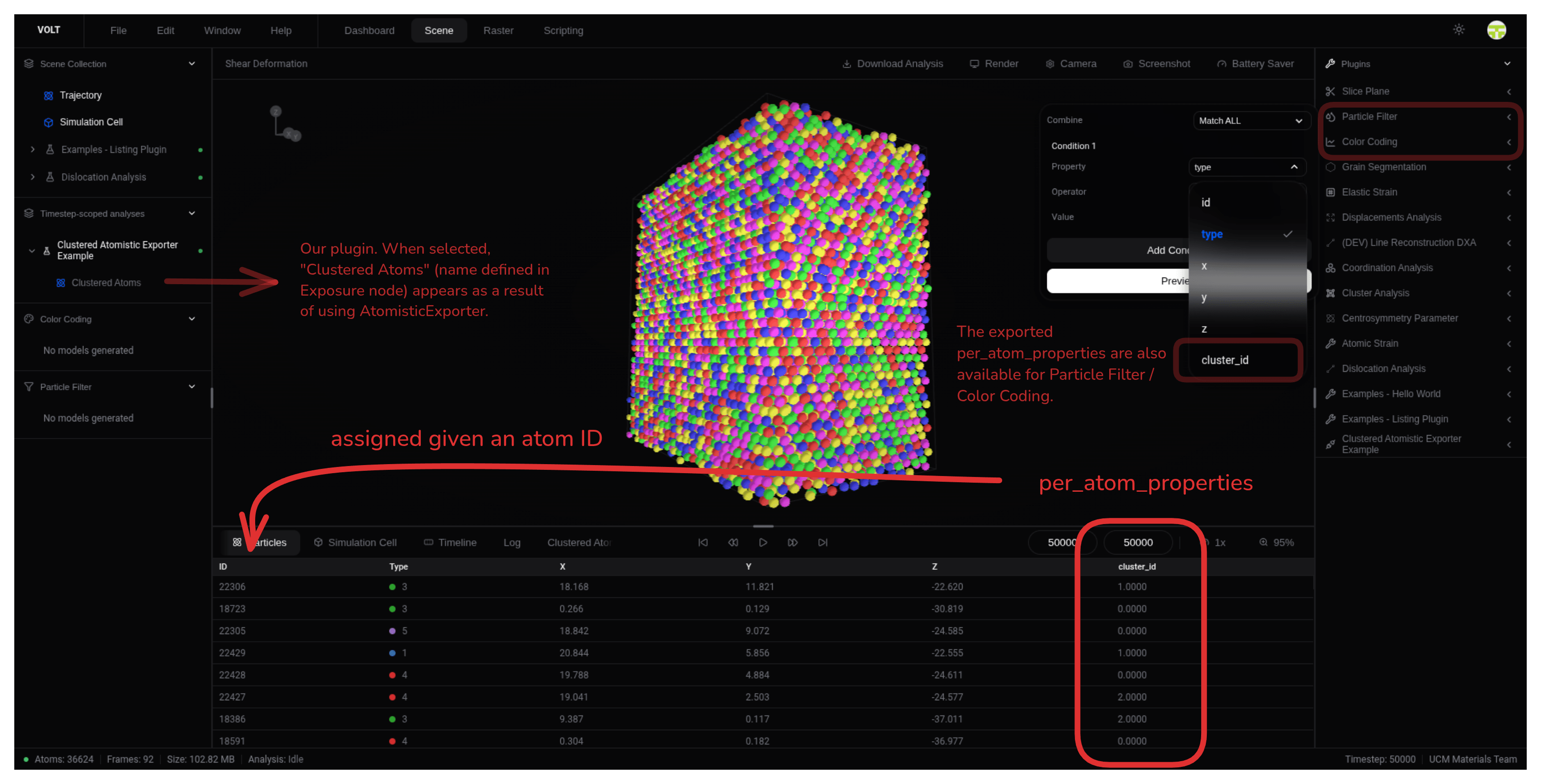

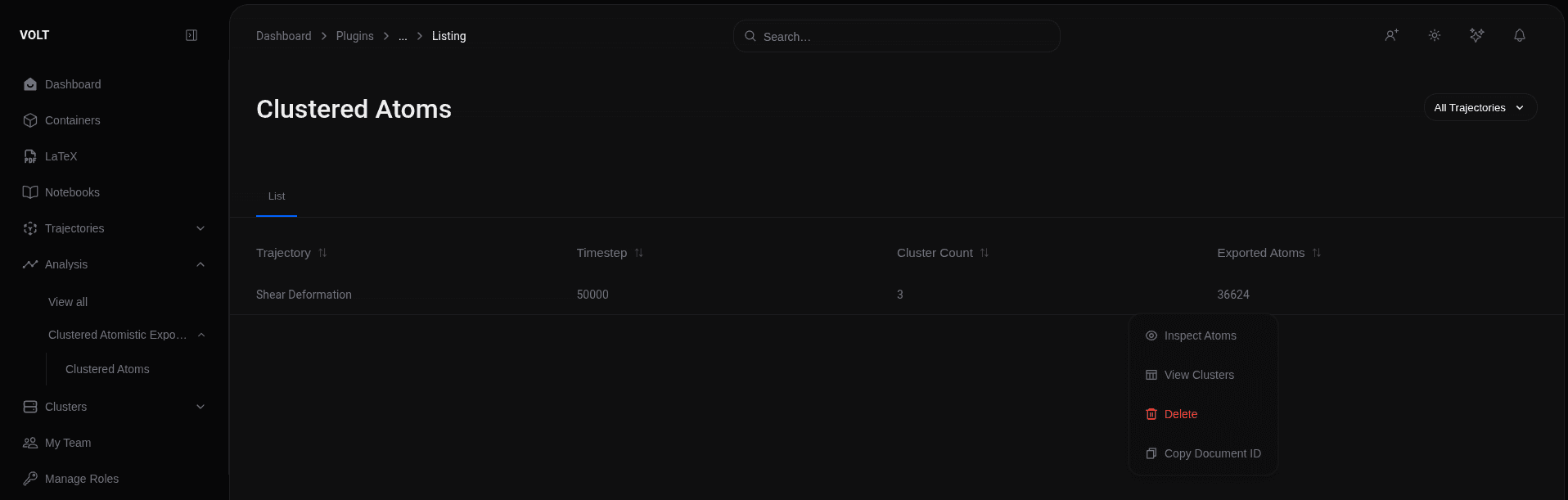
All listings from plugin analyses are also visible in the dashboard, via the sidebar path Analysis > Plugin Name > Exposure Name.
The same coloring is reproducible without AtomisticExporter groups: color coding on the exported cluster_id property produces the same cluster-based coloring.
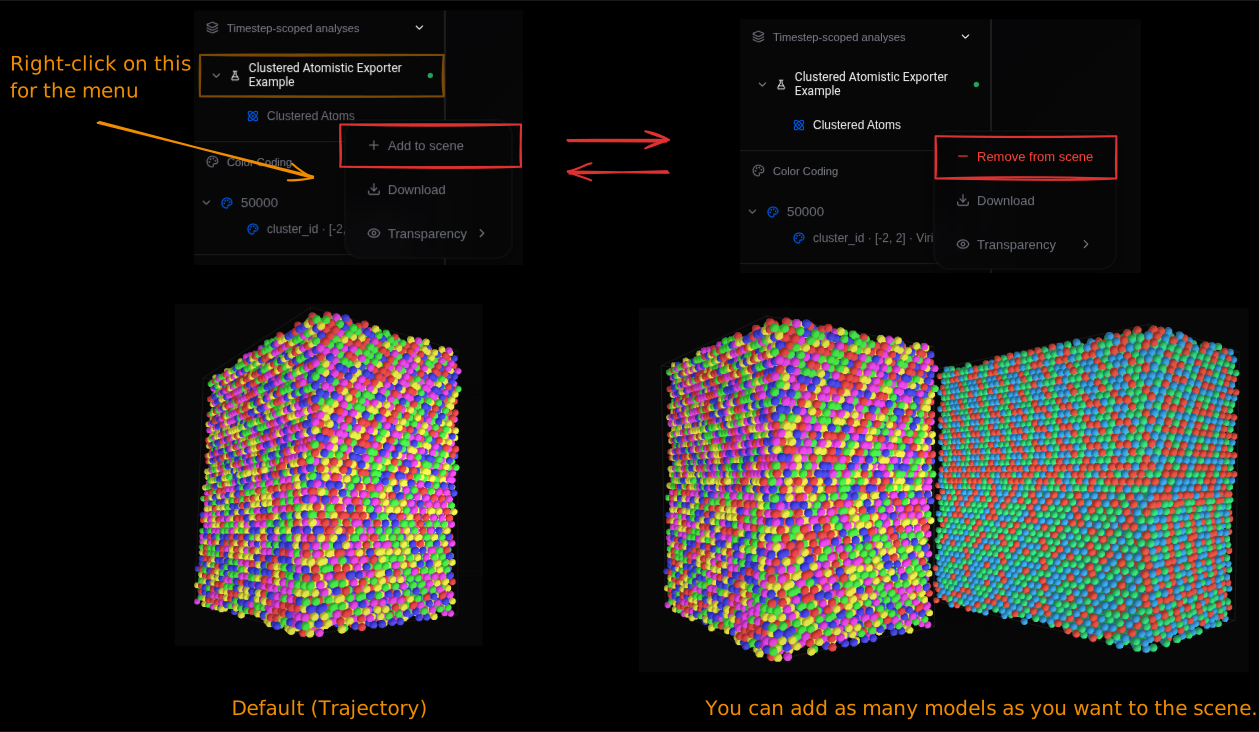
A scene can hold multiple models at once, to compare exported artifacts or add plugin-contributed models on top of the base trajectory.
Plugin right-click menu
The right-click menu manages an existing plugin.
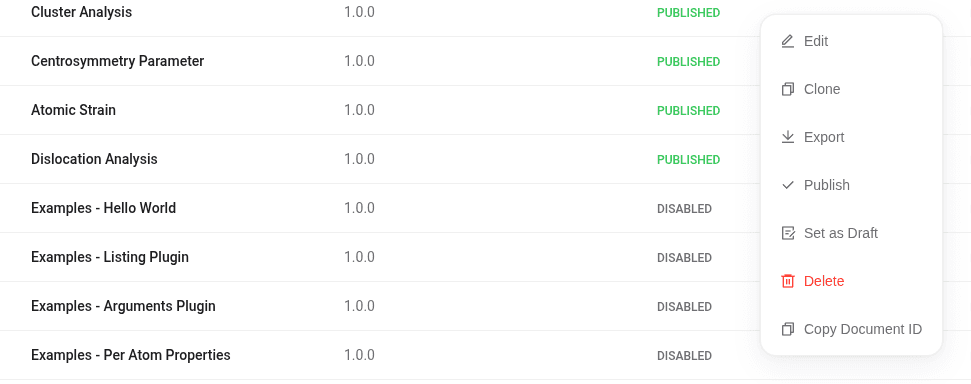
| Action | Effect |
|---|---|
| Edit | Open the plugin builder and modify the workflow |
| Clone | Create a copy of the plugin |
| Export | Export the plugin for reuse or import elsewhere |
| Publish | Make the plugin available in the canvas |
| Set as Draft | Return the plugin to draft state and hide it from the canvas |
| Delete | Remove the plugin |
A new plugin must be published to appear in the canvas. Plugins in draft state remain hidden.
Node-by-node configuration
Modifier
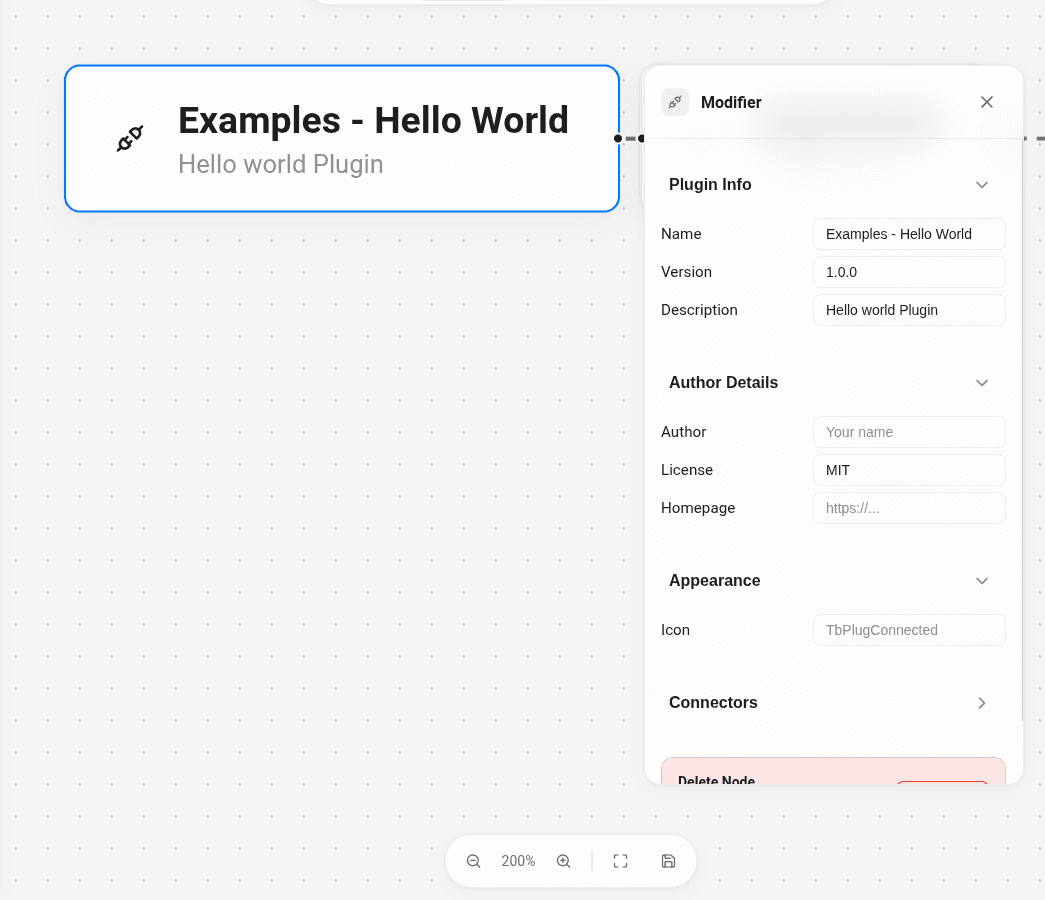
The Modifier node defines how the plugin appears in VOLT.
| Field | Example value | What it does |
|---|---|---|
| Name | Hello World Plugin | Plugin name shown in the UI |
| Version | 1.0.0 | Visible plugin version |
| Description | Prints execution information to the log | Short plugin summary |
| Author | Volt Labs | Plugin author |
| Icon | TbPlugConnected | Icon used in the plugin card/editor |
Arguments
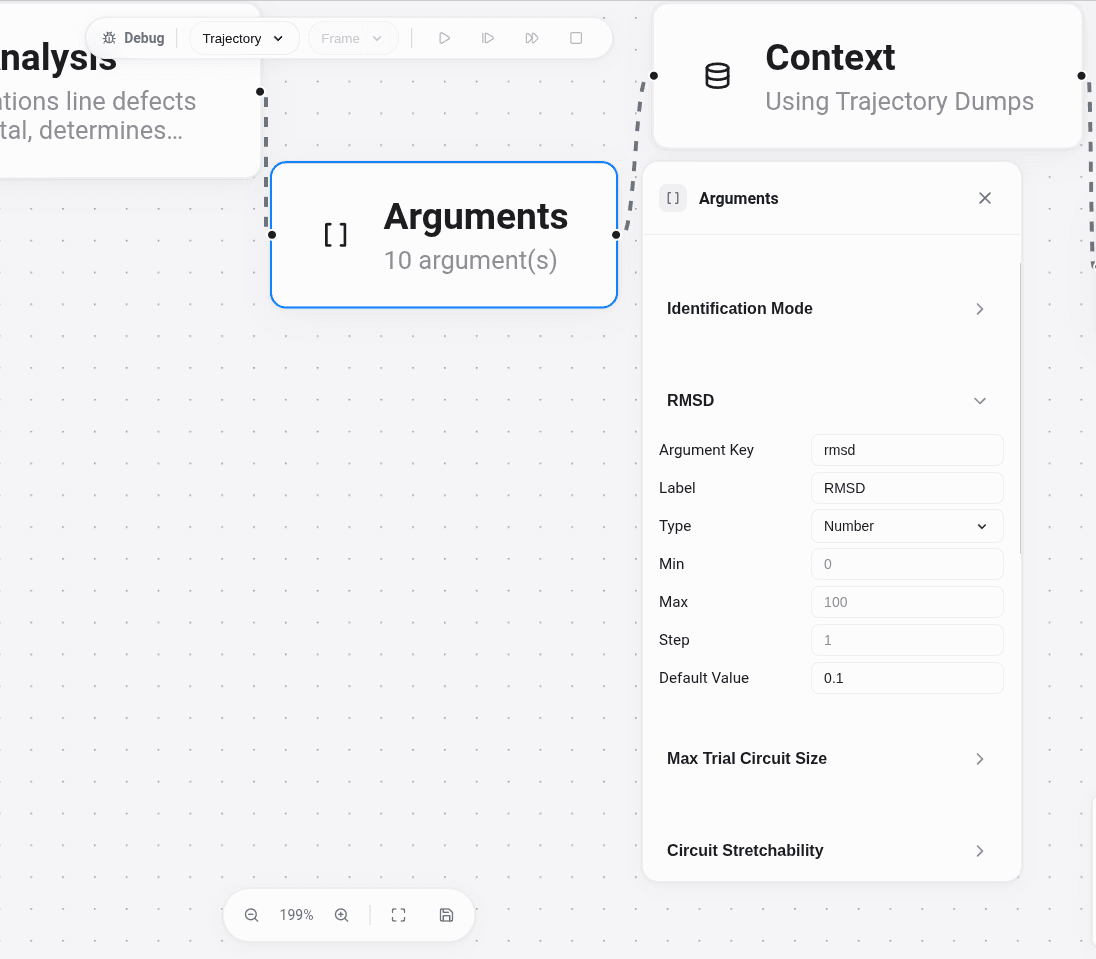
The Arguments node defines the parameters that the program receives at runtime.
If your Entrypoint arguments template contains {{ plugin-arguments.as_str }}, VOLT serializes the configured arguments and passes them to your program. For Python plugins, those values arrive in sys.argv together with the input path and the output base path.
| Field | Example value | What it does |
|---|---|---|
| Argument | cutoff | CLI parameter name |
| Type | number, boolean, string, select, list | Input type shown in the UI |
| Label | Cutoff | User-facing label |
| Default Value | 3.25 | Default runtime value |
| Min / Max / Step | 0 / 10 / 0.05 | Numeric constraints |
| Options | FCC, HCP, BCC | Options for select-like inputs |
Context
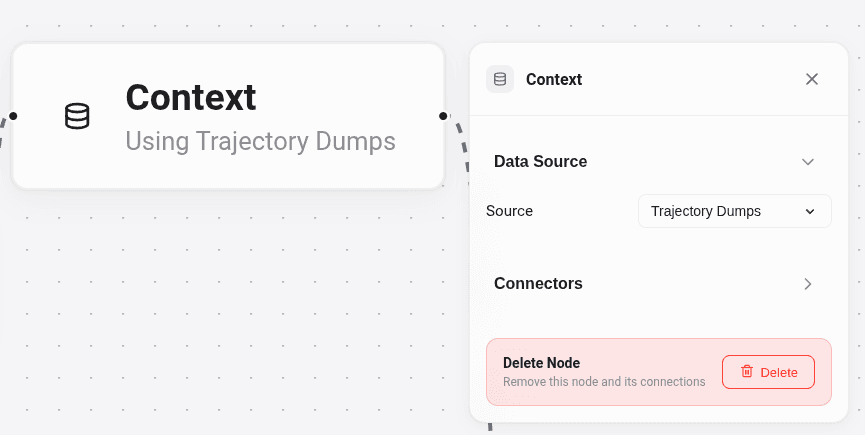
The Context node defines where the workflow gets its runtime data from. Most analysis workflows use trajectory_dumps.
| Field | Example value | What it does |
|---|---|---|
| Source | trajectory_dumps | Uses the trajectory frames generated by VOLT |
ForEach
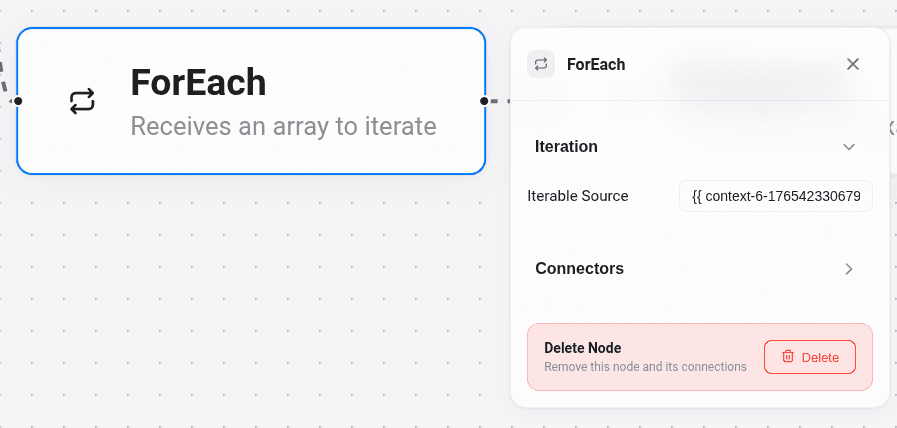
The ForEach node defines how the workflow iterates over the selected context. This is what makes most plugins run frame by frame.
| Field | Example value | What it does |
|---|---|---|
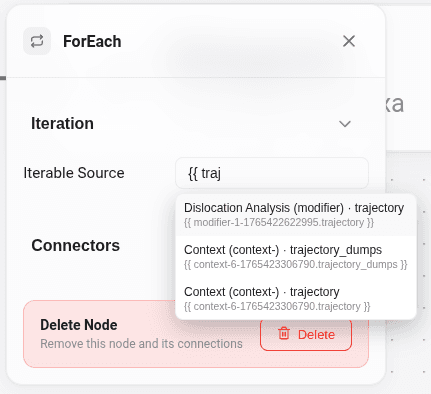
| Iterable Source | {{ trajectory-context.trajectory_dumps }} | Iterates through the trajectory dumps one by one |
The autocomplete appears while typing {{ tra... }}; the trajectory_dumps value comes from the Context node and is referenced directly from ForEach.
Entrypoint
The Entrypoint node defines how the uploaded payload is executed, and whether the payload is a Python ZIP, a single executable, or a packaged executable with extra runtime files.
| Field | Example value | What it does |
|---|---|---|
| Type | python-script | Chooses the runtime mode |
| Binary / Package | listing-example.zip | Uploaded file to execute |
| Entry Script | main.py | Script or executable inside the uploaded package |
| Requirements File | parquet | Python dependencies to install |
| Arguments | {{ foreach-trajectory-dumps.currentValue.path }} {{ foreach-trajectory-dumps.outputPath }} {{ plugin-arguments.as_str }} | Runtime argument template |
| Timeout | -1 | Optional execution timeout |
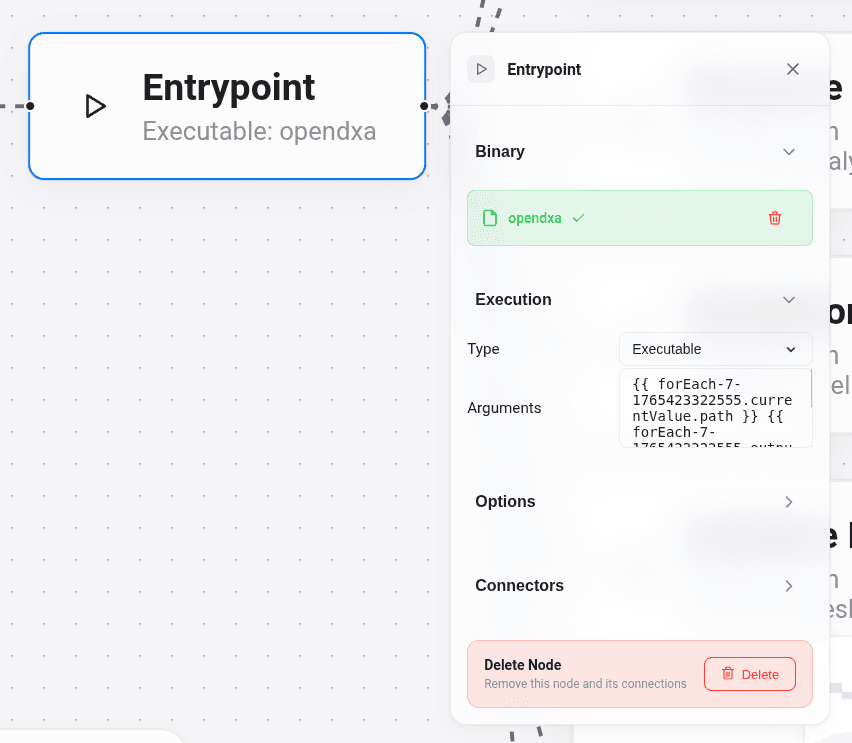
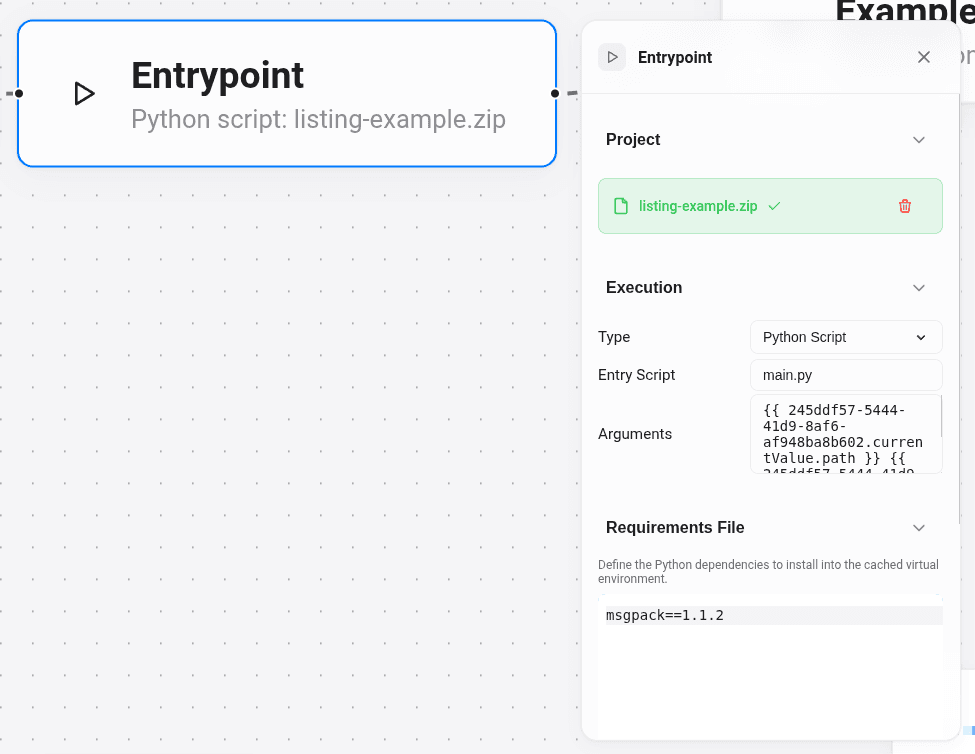
When Type is python-script, VOLT enables a field for the PyPI dependencies the script needs; they go in Requirements File and are installed before execution.
Exposure
The Exposure node tells VOLT which output file should be ingested after execution.
| Field | Example value | What it does |
|---|---|---|
| Exposure Name | Structure Identification | The label shown in VOLT for that result |
| Results File Suffix | atoms.parquet | The exact suffix the plugin writes after the output base (e.g. atoms.parquet, defect_mesh.parquet, dislocations.parquet) |
| Icon | TbEye | Optional result icon |
File naming contract. Given an output base of abc and a Results File Suffix of atoms.parquet, the plugin must write abc_atoms.parquet. VOLT will not ingest the result if the filename does not match, even when the payload is valid.
import parquet
import sys

output_base = sys.argv[2]

payload = {
    "main_listing": {
        "identified_atoms": 9211,
        "defect_atoms": 314
    }
}

with open(f"{output_base}_atoms.parquet", "wb") as f:
    f.write(parquet.packb(payload, use_bin_type=True))
If output_base is abc, this writes abc_atoms.parquet, which matches the Exposure node contract.
One Entrypoint can connect to several Exposure nodes: a single execution can produce multiple result files, each with its own exposure.
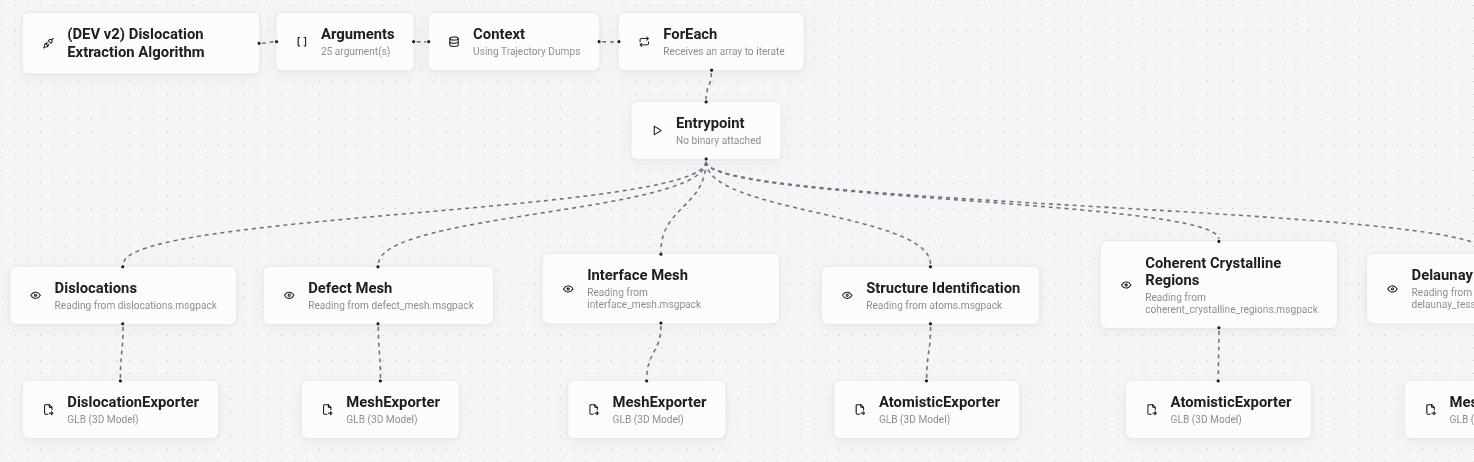
Pair each Exposure with its own Export node when different result files from the same entrypoint need different exporters.
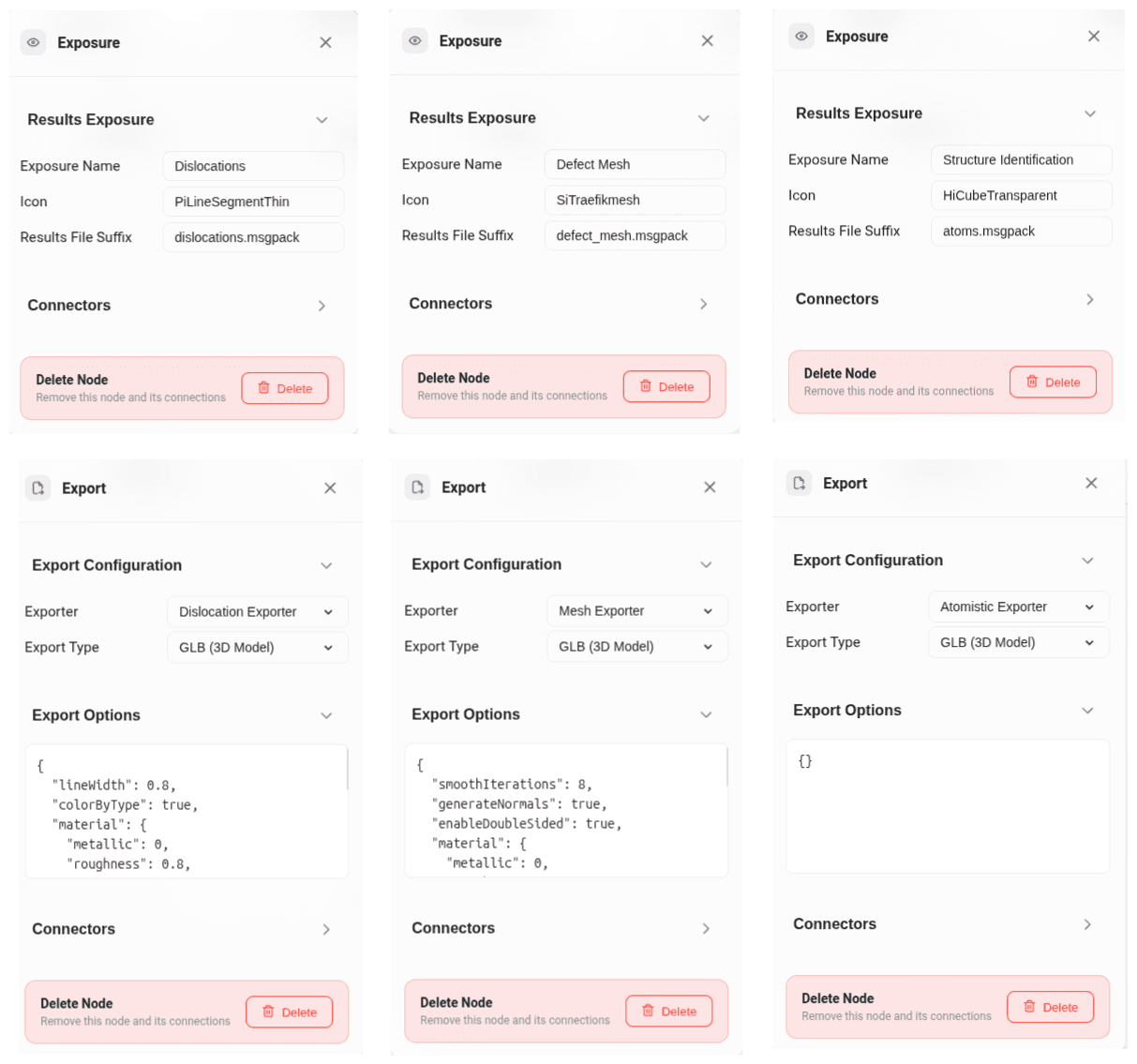
Export
The Export node tells VOLT how to convert the export payload from an exposure into an artifact.
| Field | Example value | What it does |
|---|---|---|
| Exporter | AtomisticExporter | Chooses the exporter implementation |
| Type | glb | Defines the artifact type |
| Options | { "smoothIterations": 8 } | Exporter-specific options |
An Export node requires a connected Exposure node: the exporter reads the export key from the exposure result file.
Choosing the right Entrypoint type
The Type field in the Entrypoint node selects the runtime model.
Executable
Choose Executable when you already have a single runnable binary.
- Upload a binary file directly.
- You do not set
Entry Script. - You do not use
Requirements File. - The daemon runs that binary as-is.
Python Script
Choose Python Script when your plugin is Python code packaged as a ZIP project.
- Upload a ZIP file that contains your Python project.
- Set Entry Script to the Python file inside that ZIP, for example
main.pyorscripts/cna_plugin_wrapper.py. - Paste any Python dependencies into Requirements File, or leave it empty if there are none.
Packaged Executable
Choose Packaged Executable when your runtime is a ZIP bundle that contains an executable plus supporting files such as bin/, lib/, lookup tables, or other resources.
- Upload a ZIP file.
- Set Entry Script to the executable or launcher inside the archive.
- Do not use Requirements File.
At runtime, team clusters extracts the ZIP and resolves the executable path from Entry Script before running it. A typical case is a packaged scientific binary with shared libraries, such as the native OpenDXA executable bundle.
A practical rule
| If your payload is... | Entrypoint type |
|---|---|
| one compiled binary file | Executable |
| a Python project in a ZIP | Python Script |
a ZIP with an executable plus lib/, bin/, or other runtime files | Packaged Executable |
What to put in Arguments
The Arguments field is the command template passed to the selected runtime. The arguments delivered to the entrypoint follow a common pattern:
- input dump path,
- output base path,
- optional serialized parameters.
| Variable | Resolves to |
|---|---|
{{ foreach-trajectory-dumps.currentValue.path }} | The current input dump path |
{{ foreach-trajectory-dumps.outputPath }} | The output base path used by exposures |
{{ plugin-arguments.as_str }} | All UI-configured plugin arguments serialized as CLI flags |
{{ <entrypoint-node-id>.projectPath }} | The extracted package directory (for packaged executables) |
A Python ZIP typically uses:
{{ foreach-trajectory-dumps.currentValue.path }} {{ foreach-trajectory-dumps.outputPath }} {{ plugin-arguments.as_str }}A packaged executable typically uses:
{{ foreach-trajectory-dumps.outputPath }}_annotated.dump {{ foreach-trajectory-dumps.outputPath }} --lattice_dir {{ analysis-entrypoint.projectPath }}/share/volt/lattices {{ plugin-arguments.as_str }}The script reads the input dump from sys.argv[1], the output base from sys.argv[2], and writes a parquet file whose name matches the exposure suffix:
import sys
import parquet

input_file = sys.argv[1]
output_base = sys.argv[2]

payload = {
    "main_listing": {
        "ok": True
    }
}

with open(f"{output_base}_results.parquet", "wb") as f:
    f.write(parquet.packb(payload, use_bin_type=True))
When the exposure suffix is results.parquet, this file is ingested correctly.
The upload button in the Entrypoint editor is enabled only after the plugin has been saved at least once. Save the workflow before uploading the binary or ZIP.
What can go inside one exposure file
An exposure file is an Apache Parquet object containing one or more of these keys:
{
  "main_listing": {},
  "sub_listings": {},
  "per-atom-properties": [],
  "export": {}
}| Key | Use it for |
|---|---|
main_listing | Small summary values |
sub_listings | Tables with many rows |
per-atom-properties | Values attached to atoms by id |
export | Data consumed by AtomisticExporter, MeshExporter, LineExporter, or ChartExporter |
One exposure can contain only one of these keys, or several at once.
Returning listings
To show summary values and result tables, return main_listing and sub_listings.
payload = {
    "main_listing": {
        "total_points": 1145,
        "dislocations": 319,
        "total_length": 2825.21
    },
    "sub_listings": {
        "dislocation_segments": [
            {
                "segment_id": 0,
                "length": 11.45,
                "magnitude": 0.408,
                "burgers_vector": [-0.16, -0.16, -0.33]
            }
        ]
    }
}
Returning per-atom-properties
Use per-atom-properties when you want VOLT to attach analysis values back to atoms. Each row must identify the atom with id, which links the row back to that atom.
Row format
{
  "per-atom-properties": [
    {
      "id": 1,
      "csp": 0.042,
      "strain": [0.10, 0.02, -0.01],
      "structure_type": 2
    },
    {
      "id": 2,
      "csp": 0.731,
      "strain": [0.18, 0.05, 0.00],
      "structure_type": 0
    }
  ]
}
Columnar format
VOLT also accepts a columnar shape:
{
  "per-atom-properties": {
    "id": [1, 2],
    "csp": [0.042, 0.731],
    "strain": [
      [0.10, 0.02, -0.01],
      [0.18, 0.05, 0.00]
    ],
    "structure_type": [2, 0]
  }
}
Important details:
- Scalar values work as-is.
- Array values also work. VOLT flattens them into fields such as
strain[0],strain[1], andstrain[2]when needed. - Use this key to let users filter atoms, color by a numeric property, or inspect analysis values in the particles table.
Using AtomisticExporter
Use AtomisticExporter when your result is a set of atoms or points that should come back into the viewer as a GLB artifact.
In the Export node:
- choose AtomisticExporter,
- choose export type glb,
- connect that export node to the exposure that will contain the atom payload.
Then write the export payload inside the same Apache Parquet file under export.
Single-object export format
{
  "export": {
    "AtomisticExporter": {
      "FCC": [
        { "id": 1, "pos": [0.0, 0.0, 0.0] },
        { "id": 2, "pos": [0.5, 0.5, 0.0] }
      ],
      "HCP": [
        { "id": 3, "pos": [1.0, 0.0, 0.0] }
      ],
      "Other": [
        { "id": 4, "pos": [1.5, 0.5, 0.0] }
      ]
    }
  }
}
Array export format
{
  "export": [
    {
      "AtomisticExporter": {
        "FCC": [
          { "id": 1, "pos": [0.0, 0.0, 0.0] }
        ]
      }
    },
    {
      "AtomisticExporter": {
        "Defects": [
          { "id": 9, "pos": [2.0, 0.0, 0.0] }
        ]
      }
    }
  ]
}
Important details:
- VOLT accepts both envelopes: one exporter object, or an array of exporter objects.
- In the single-object form, the payload is a grouped object where each key is a group name, and those names drive the colouring in the viewer.
- Names like
FCC,BCC,HCP,Other, orCluster 7map directly to existing palettes. - The
posfield is required for each atom. - The array form produces one artifact per array entry.
This is the exporter used by Structure Identification and coherent crystalline region overlays.
Combining multiple result types in one exposure
A single exposure can return:
- a summary in
main_listing, - atom-attached values in
per-atom-properties, - and a 3D overlay in
export.
{
  "main_listing": {
    "identified_atoms": 9211,
    "defect_atoms": 314
  },
  "per-atom-properties": [
    { "id": 1, "structure_type": 2 },
    { "id": 2, "structure_type": 0 }
  ],
  "export": {
    "AtomisticExporter": {
      "FCC": [
        { "id": 1, "pos": [0, 0, 0] }
      ],
      "Other": [
        { "id": 2, "pos": [1, 0, 0] }
      ]
    }
  }
}
Downloadable example plugins
Most of the ZIPs below are small entrypoint examples that contain only the plugin code; you still configure the workflow itself from the UI with nodes.
- hello-world-plugin.zip
- arguments-example.zip
- listing-example.zip
- atomistic-exporter-clusters.zip
- per-atom-properties.zip
hello-world-plugin
- Download: hello-world-plugin.zip
- This is the smallest possible example of an Entrypoint node.
- Shows that VOLT executes your script and that anything you
print(...)appears in the execution log. - Does not write an exposure file. Useful for verifying entrypoint execution before adding
Exposureoutputs.
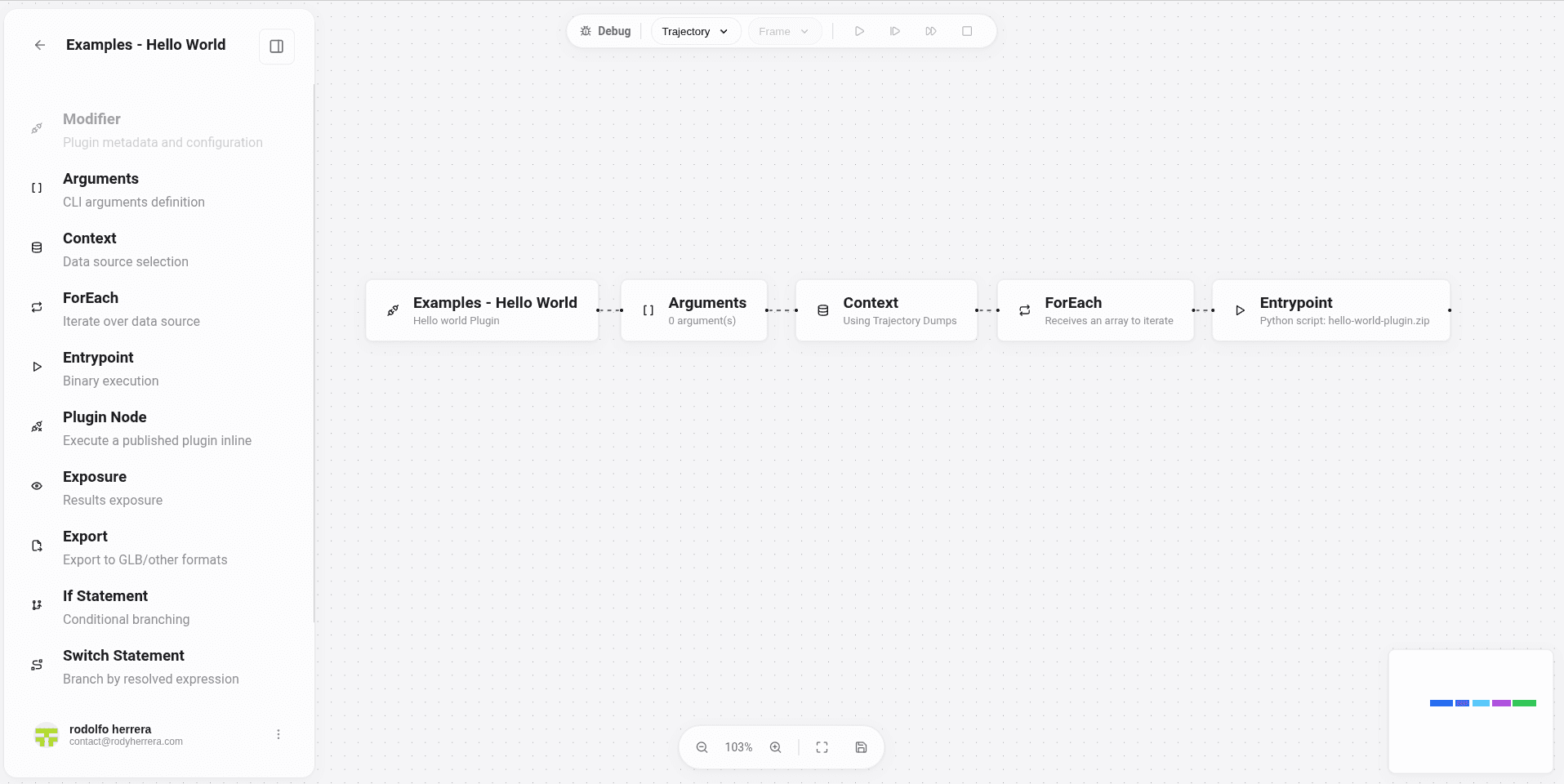
Flow in the builder
Modifier -> Arguments -> Context -> ForEach -> Entrypoint
The Arguments node can stay empty for this example.
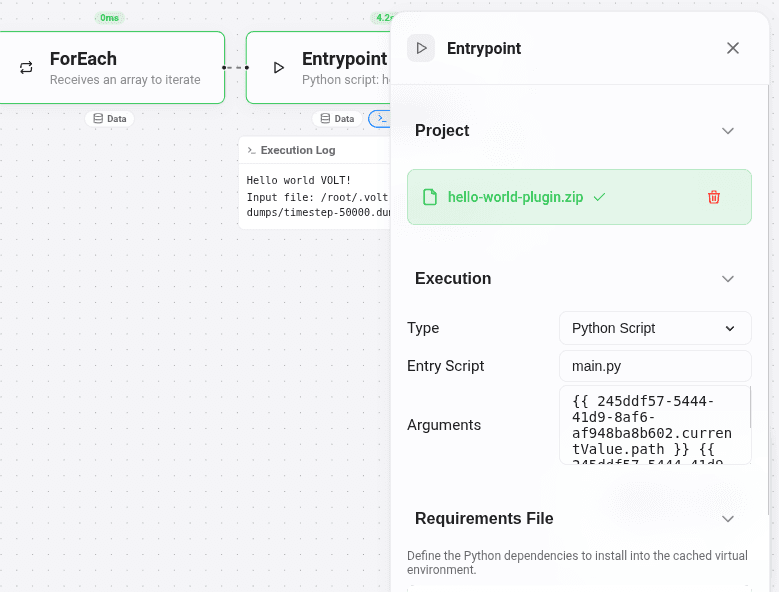
The Entrypoint node is where you upload the ZIP and tell VOLT how to execute the Python script inside it.
import sys

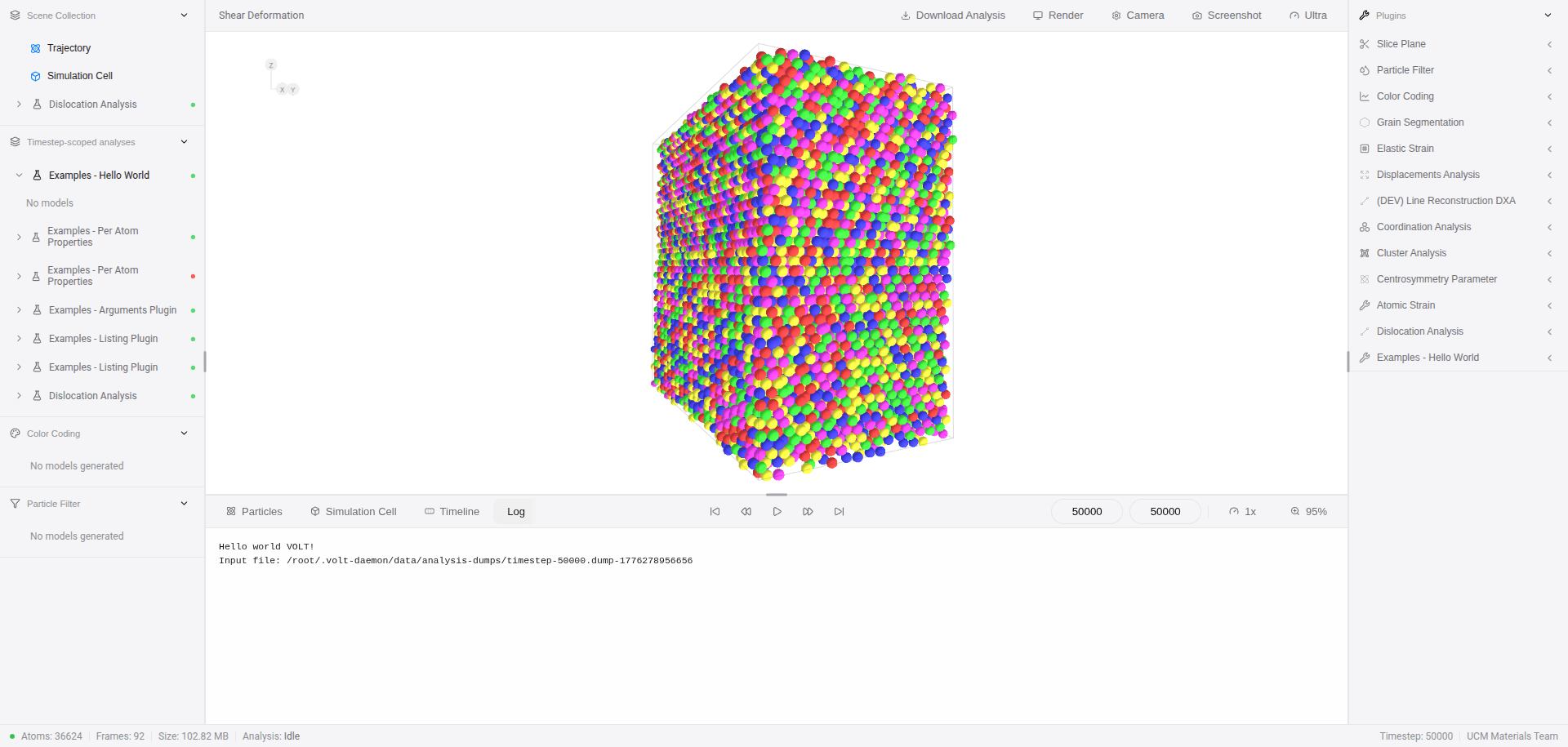
print('Hello world VOLT!')

# VOLT first-argument correspond to the input file.
input_file = sys.argv[1]

print(f'Input file: {input_file}')
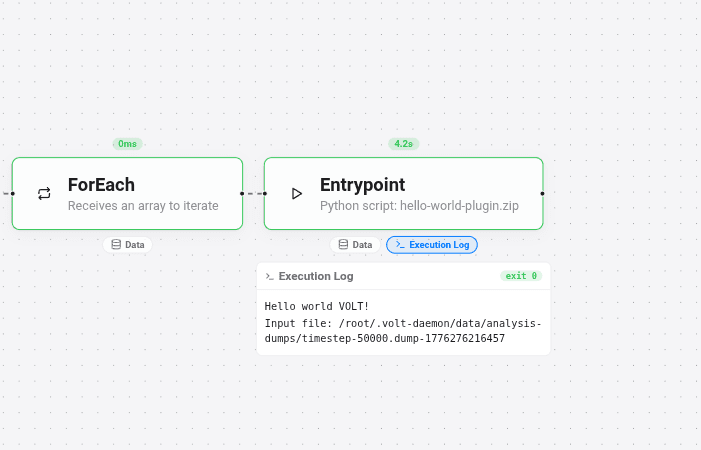
The execution log is the expected result: the print(...) output appears after the Entrypoint node runs.
arguments-example
- Download: arguments-example.zip
- Demonstrates what the Entrypoint node passes into the script through
sys.argv. - Prints the runtime arguments to the execution log for inspection.
Flow in the builder
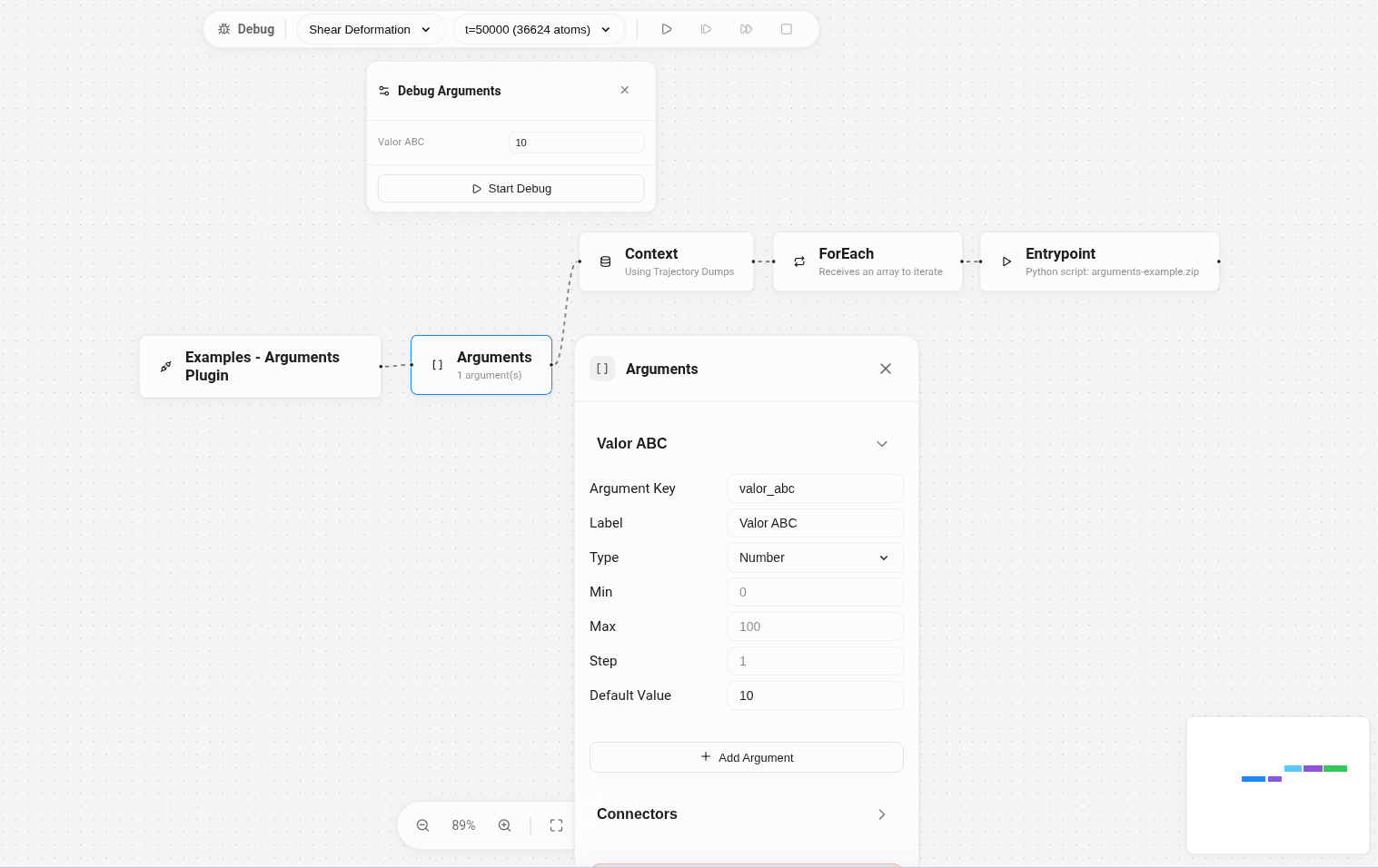
Modifier -> Arguments -> Context -> ForEach -> Entrypoint
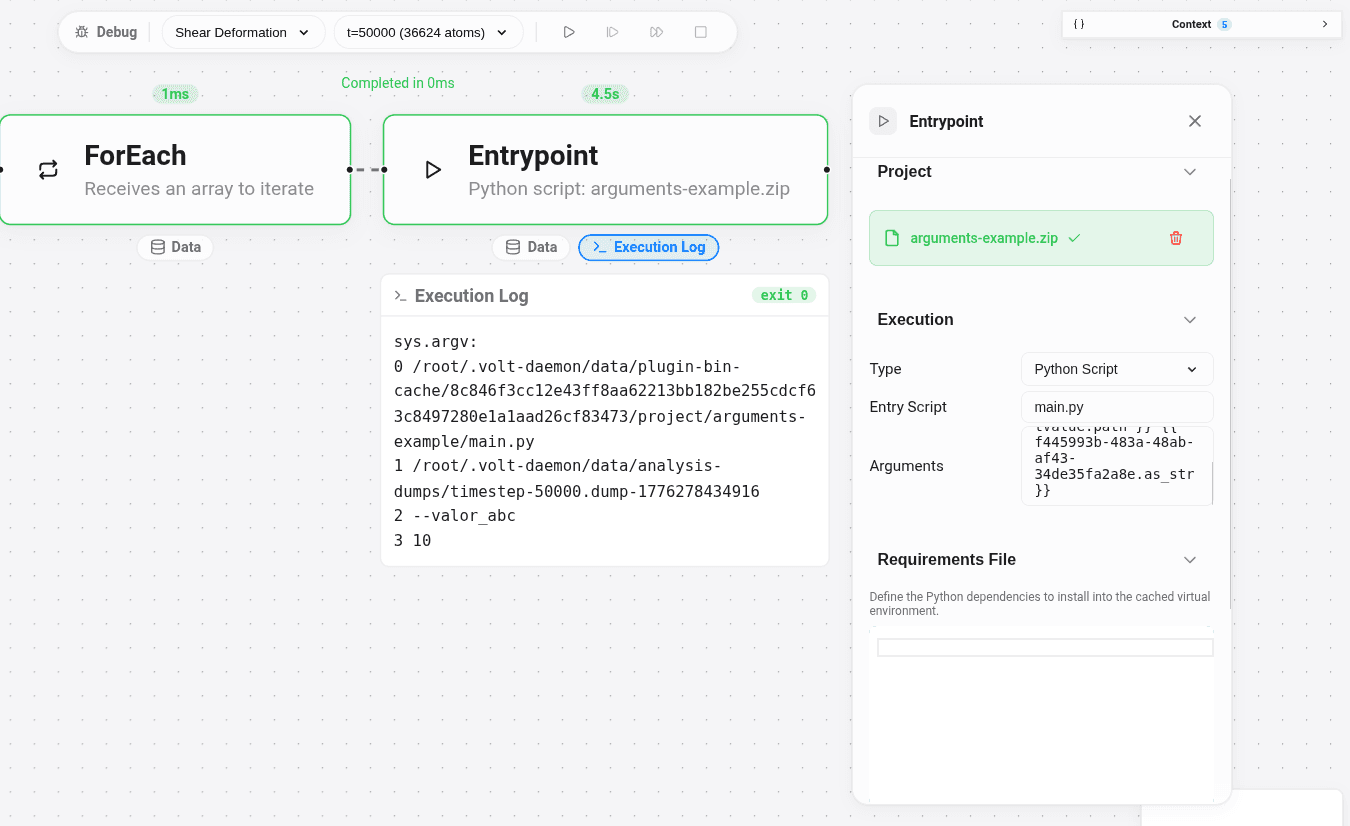
The image below shows the full example: user-facing arguments at the top, the workflow in the center, and the Arguments node configuration at the bottom.
import sys

print('sys.argv:')
for idx, arg in enumerate(sys.argv):
    print(idx, arg)
The execution log lists the received arguments one by one.
listing-example
- Download: listing-example.zip
- Shows how an Exposure node returns
main_listingandsub_listings— the result shape VOLT reads to render summary values and result tables. - If the Exposure node uses
example.parquetas its results suffix, this script writes the correct file:{outputBase}_example.parquet. - Once the run finishes, the output is visible through the exposure result in VOLT rather than only in the execution log.
Flow in the builder
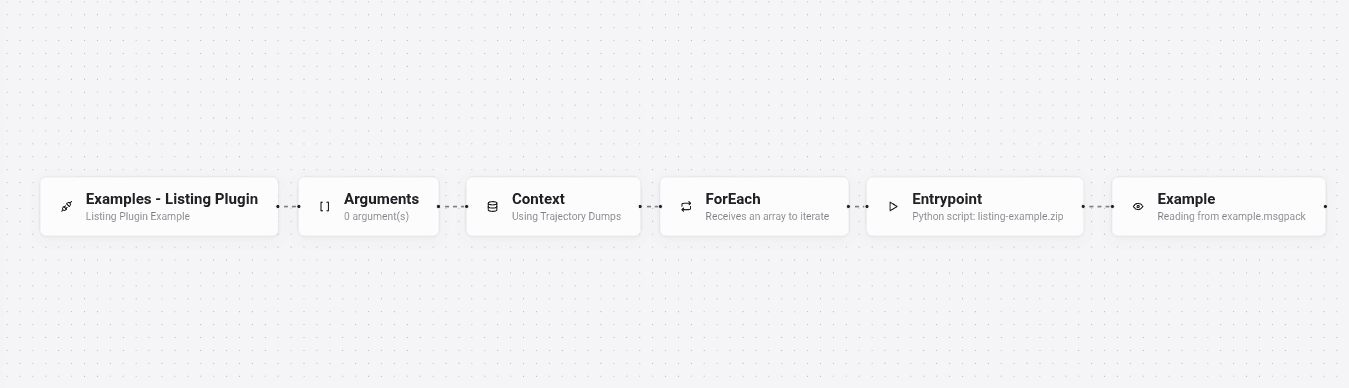
Modifier -> Arguments -> Context -> ForEach -> Entrypoint -> Exposure
The key node is Exposure: it tells VOLT to ingest the Apache Parquet file written by the program and render the listing output in the UI.
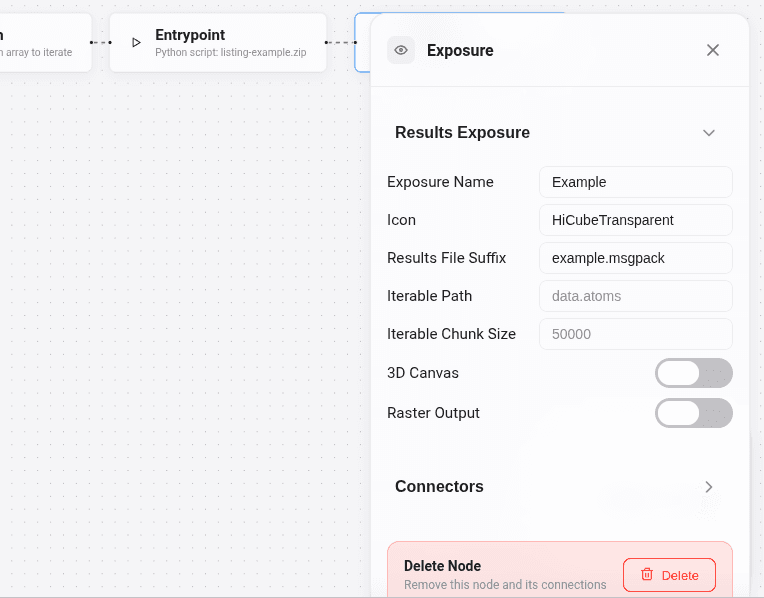
The Exposure node configuration is where the results file suffix is defined, so it must match the filename written by the Python code.
import parquet
import sys

# Each key in main_listing and sub_listings becomes a column name in VOLT.
payload = {
    'main_listing': {
        'average_segment_length': 8.856480893829213,
        'max_segment_length': 15.068283281607219,
        'min_segment_length': 0.0004022584697172903,
        'total_length': 2825.2174051315187,
        'total_points': 1145,
        'dislocations': 319
    },
    'sub_listings': {
        'circuit_information': [
            {
                'average_edge_count': 5.155642023346304,
                'dangling_circuits': 0,
                'total_circuits': 514
            }
        ],
        'dislocation_segments': [
            {
                'burgers_vector': [-0.16666666666666669, -0.16666666666666666, -0.3333333333333333],
                'length': 11.45334956118728,
                'magnitude': 0.408248290463863,
                'segment_id': 0
            },
            {
                'burgers_vector': [-0.3333333333333333, 0.16666666666666652, 0.16666666666666674],
                'length': 10.363263816655667,
                'magnitude': 0.40824829046386296,
                'segment_id': 1
            }
        ]
    }
}

output_base = sys.argv[2]
with open(f'{output_base}_example.parquet', 'wb') as f:
    f.write(parquet.packb(payload, use_bin_type=True))

print(f'Wrote {output_base}_example.parquet')
Running plugins in the canvas
Once the plugin is created and published, it becomes available in the trajectory canvas.
Two runtime inputs appear by default when a plugin is selected in the canvas:
- Cluster: the cluster where the plugin will run.
- Selected timesteps: the timesteps that will be executed.
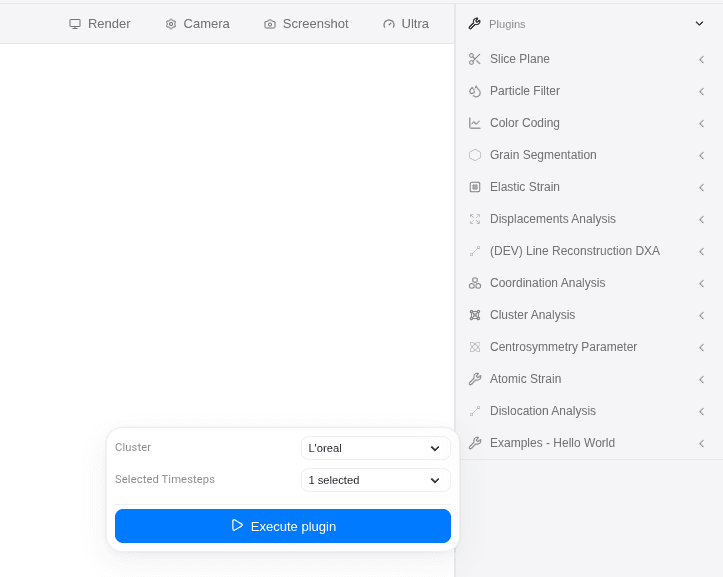
When testing a plugin on a trajectory, select a specific timestep first. Leaving the execution on the default full range will fail across all timesteps if the plugin is misconfigured.
When a plugin starts executing, its status is updated in real time:
queuerunningsuccess
An executed plugin exposes a right-click menu in the canvas with the following actions:
- Select
- Download
- Delete
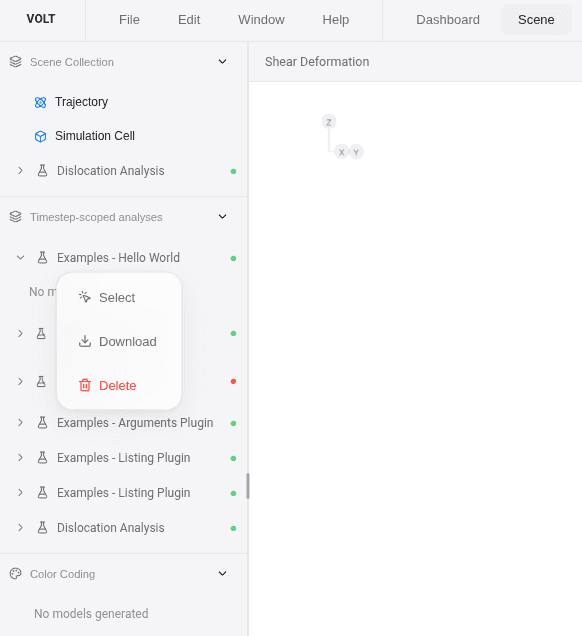
When a plugin has execution output, the canvas timeline enables a new tab named Log, showing the execution output for the currently selected timestep.
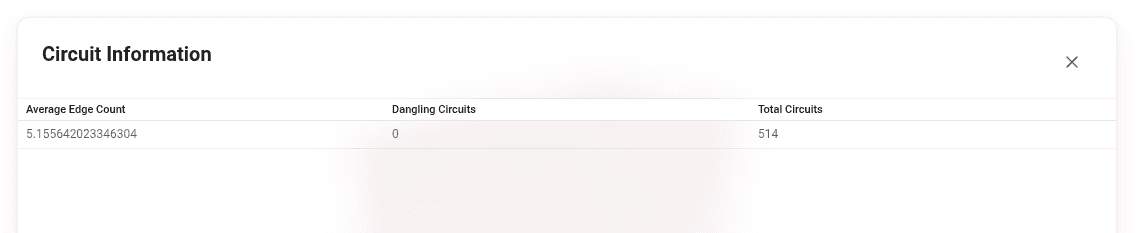
If the plugin returns an exposure with main_listing, the canvas also enables a new tab named after that exposure. In the listing-example, that tab corresponds to the exposure configured earlier in the workflow. Because the example uses hardcoded values, every timestep shows the same main_listing rows.

Each main_listing row also has its own right-click menu, with these actions:
- View inspect atoms
- Delete
View <sub_listing_name>for each exported sub-listing
In this example, the code exports two sub-listings:
circuit_informationdislocation_segments

The last image shows one of those sub-listings, circuit_information, for the selected timestep.
per-atom-properties
- Download: per-atom-properties.zip
- Shows how to return
per-atom-propertiesfrom an Exposure node, attaching derived values back to atoms byid. - Those values can then be used in the particles table, filters, and color coding workflows.
- It does not create a GLB by itself; it teaches the per-atom data contract, not a 3D exporter.
Flow in the builder
Modifier -> Arguments -> Context -> ForEach -> Entrypoint -> Exposure
Same flow as the listing example, but the payload returns per-atom-properties keyed by atom id instead of main_listing / sub_listings.
import math
import parquet
import sys

with open(sys.argv[1]) as f:
    lines = f.read().splitlines()

cols_idx = next(
    idx for idx, line in enumerate(lines)
    if line.startswith('ITEM: ATOMS')
)

cols = lines[cols_idx].split()[2:]
id_idx = cols.index('id')
x_idx = cols.index('x') if 'x' in cols else None
y_idx = cols.index('y') if 'y' in cols else None
z_idx = cols.index('z') if 'z' in cols else None

rows = []
for raw_line in lines[cols_idx + 1:]:
    values = raw_line.split()
    atom_id = int(values[id_idx])

    position = None
    if x_idx is not None and y_idx is not None and z_idx is not None:
        position = [
            float(values[x_idx]),
            float(values[y_idx]),
            float(values[z_idx])
        ]

    rows.append({
        'id': atom_id,
        'structure_type': atom_id % 4,
        'coordination': 12 if atom_id % 2 == 0 else 11,
        'distance_from_origin': math.sqrt(sum(component * component for component in position)) if position else 0.0,
        'position_copy': position or [0.0, 0.0, 0.0]
    })

payload = {
    'per-atom-properties': rows
}

output_base = sys.argv[2]
with open(f'{output_base}_example.parquet', 'wb') as f:
    f.write(parquet.packb(payload, use_bin_type=True))

print(f'Wrote {output_base}_example.parquet')